
Analysing and Reconstructing Site Architecture Using Breadcrumbs: A Practical SEO Guide
Arash Seyfi
Posted 20 February, 2026 by Arash Seyfi in Screaming Frog, SEO
Analysing and Reconstructing Site Architecture Using Breadcrumbs: A Practical SEO Guide
Analysing site architecture is one of the most important — and often most challenging — aspects of technical SEO, particularly for large websites.
In many projects, SEO professionals rely on signals such as URL folder structures, crawl depth, or internal linking graphs to understand how a site is organised. However, these signals do not always reflect the actual logic behind content categorisation or the architectural decisions made at a business level.
As a result, it is common to see site architecture analyses that appear technically sound, yet provide limited value when it comes to improving user experience or making informed structural decisions.
In this article, we take a different approach by focusing on a data source that is typically rooted directly in a site’s information architecture and commercial logic: page breadcrumbs.
We begin by exploring the limitations of common site architecture analysis methods and explain why breadcrumbs often provide a more accurate representation of a site’s true structure. We then walk through a practical, step-by-step workflow showing how breadcrumb data can be extracted using the Screaming Frog SEO Spider, processed with Python, and ultimately used to reconstruct the site architecture as a clear, analysable, and visual tree model.
This article is a guest contribution from Arash Seyfi, Technical SEO Specialist at Jangal Publishing.
What Is Site Architecture?
When we talk about site architecture, we are not simply referring to how pages link to one another. Site architecture reflects the underlying logic used to organise content across a website — defining how pages are grouped, how sections relate to each other, and how those relationships are presented to users and search engines.
More precisely, site architecture refers to the structural design of a website that determines how pages are organised, connected, and internally linked in a way that supports user experience, crawlability, and ultimately the site’s commercial objectives.
On smaller websites, understanding this structure is usually straightforward and can often be assessed by reviewing a limited number of page paths. However, on larger sites — particularly ecommerce websites with thousands of products, categories, and landing pages — site architecture quickly becomes more complex and multi-layered.
In these scenarios, accurately extracting and reconstructing the true site architecture becomes a significant challenge for SEO and digital marketing professionals. When this challenge is overlooked, decisions around content expansion, internal linking optimisation, or even full architecture redesigns risk being based on incomplete data or incorrect assumptions.
Common Approaches to Extracting Site Architecture (and Their Limitations)
When analysing or attempting to reconstruct site architecture, there are several commonly used approaches, each offering a partial view of how a website is structured. Many of these methods can be implemented using crawl data and tools such as the Screaming Frog SEO Spider. However, an important limitation remains: none of these approaches, on their own, reliably reflect the logical structure intended by the business.
The most common approaches typically include:
- Reviewing site taxonomy and navigation elements, such as menus, category structures, and footer links
- Relying on XML or HTML sitemaps
- Analysing URL patterns and directory structures
- Assessing crawl depth and discovery paths
- Examining internal linking graphs
- Using Screaming Frog SEO Spider’s Directory Tree Visualisations
Directory Tree Visualisations are particularly useful because they provide a hierarchical, visual representation of the site’s URL structure. They allow you to quickly see the arrangement of directories and subdirectories, making it easier to spot structural patterns and potential issues. These visualisations can also highlight sections of the site that are heavily nested or potentially under-optimised. While they don’t fully reflect the business-defined parent-child relationships between pages, they are a powerful tool for understanding URL-level organisation and supporting technical SEO analysis.
While each of these methods can be useful, they tend to emphasise technical or implementation-level signals, rather than the formal and logical hierarchy defined by a site’s information architecture.
For example, URL structures may reflect historical or technical constraints rather than current category logic. Crawl visualisations are built around depth and shortest discovery paths, which can bias the resulting view towards incidental linking patterns. Similarly, internal linking graphs are effective at illustrating linking behaviour and accessibility, but they do not necessarily represent the official hierarchy of categories and sub-sections.
As a result, particularly on large websites — and especially on ecommerce platforms — relying solely on these conventional approaches can lead to an incomplete or even misleading understanding of the site’s true architecture.
For this reason, instead of focusing on URLs, crawl depth, or internal link graphs, this article turns to a data source that often provides a more direct reflection of business-defined structure: page breadcrumbs.
Breadcrumbs: A Reliable Representation of True Site Structure
Breadcrumbs are one of the few website elements that are typically designed directly based on a site’s information architecture and business logic, rather than purely technical considerations or implementation constraints. As a result, they often provide a representation that aligns more closely with the structure intended by site owners, rather than the accidental hierarchy that might arise from URL patterns or link distribution.
Unlike URL structures or internal linking graphs, breadcrumbs usually display a clear hierarchical path that the site wants both users and search engines to understand. Each breadcrumb path explicitly shows:
- which category a page belongs to,
- which main branch that category falls under, and
- the logical route to reach the page from the perspective of the site’s architecture.
From a site architecture analysis standpoint, breadcrumbs can be considered a type of official representation of site structure. This representation is both visible to users and typically designed to enhance navigation, user experience, and the overall understanding of the site’s hierarchy.
These characteristics make breadcrumb data a more reliable source for reconstructing the actual site architecture in many cases — particularly on large ecommerce websites — compared to methods that rely solely on technical signals.
Comparing Breadcrumb-Based Site Architecture with Screaming Frog SEO Spider’s Directory Tree Visualisations
When it comes to understanding a website’s structure, site architecture isn’t just about URLs or internal links. It represents how a business organises its content — how pages and categories are grouped, how they relate to each other, and how these relationships are presented to both users and search engines.
On many websites, especially large e-commerce platforms, the true hierarchical structure — the parent-child relationships between categories and pages — is not always visible in the URLs. However, it is often clearly reflected in page breadcrumbs, which are designed based on the site’s information architecture and business logic.
Screaming Frog SEO Spider’s Directory Tree Visualisations show a website based on URL paths and directory structures. While this approach is useful for analysing URL organisation and technical structure, it doesn’t necessarily represent the actual parent-child relationships that the business defines. Essentially, what you see is a hierarchy of URLs, not the logical grouping of content.
Our breadcrumb-based method takes a different approach. By extracting breadcrumb data from pages, we can reconstruct the website’s architecture as it is intended by the business. The resulting structure shows the real parent-child relationships between categories and pages, rather than just following URL patterns. This approach provides a clearer picture of the site’s content hierarchy and is especially valuable for competitor analysis, SEO audits, and digital marketing strategies. It allows you to see how a site is truly organised, from a business perspective.
Here’s a summary of the key differences between the two approaches:
By comparing these two approaches side by side, it becomes clear why a breadcrumb-based analysis often gives more actionable insights for improving navigation, understanding content depth, and making strategic SEO or structural decisions.
How to Reconstruct Site Architecture Using Breadcrumb Data
The core idea behind this approach is to convert page-level breadcrumb paths into a structured, analysable model of site architecture. Instead of relying on URLs, crawl depth, or internal linking patterns, this method focuses on the hierarchical paths that the site itself defines to represent content relationships to users.
By extracting breadcrumb data across all relevant pages and analysing these paths collectively, it becomes possible to reconstruct site architecture as a hierarchical tree that more closely reflects information architecture decisions and business-driven structure, rather than purely technical implementations.
In the following sections, we walk through this process step by step — from extracting breadcrumb data using the appropriate tooling, to preparing the dataset, and finally reconstructing and visualising site architecture. The goal is to present a practical and scalable workflow that can be applied to large websites with minimal manual intervention.
Step 1: Extracting Breadcrumb Data Across All Site Pages
To extract breadcrumb data across an entire website, we need a tool that can crawl pages at scale and return the required information in a structured format. In this workflow, the selected tool must support full-site crawling while also allowing targeted extraction of specific HTML elements.
The Screaming Frog SEO Spider is particularly well suited to this task. In addition to its crawling capabilities, it provides flexible options for extracting custom data directly from page markup. Rather than relying on the tool’s standard reports, this approach focuses specifically on using Custom Extraction to collect breadcrumb information from all relevant pages.
To improve both efficiency and accuracy, the crawl is configured to avoid collecting unnecessary data. Instead of extracting every available signal, Screaming Frog is set up so that the primary focus remains on breadcrumb paths. For this reason, the tool is deliberately configured in two key areas — Spider and Custom Extraction — which are covered step by step in the following sections.
Configuring Settings in the Screaming Frog SEO Spider
In this workflow, the primary objective is to extract breadcrumb data only. Other crawl data is not required. For this reason, the Spider settings are intentionally kept as minimal as possible to improve crawl speed and reduce unnecessary data collection.
By limiting the crawl to only what is needed, the process runs more efficiently and ensures that the tool remains focused on pages that are relevant for breadcrumb extraction.
To apply these settings, navigate to Configuration within the SEO Spider and review the Spider options according to the paths outlined below. In each section, only the essential settings are enabled, while all non-critical options are left disabled to avoid collecting extraneous data.
Configuration → Spider → Crawl

[Image: Screaming Frog SEO Spider Crawl configuration]
Configuration → Spider → Extraction

[Image: Screaming Frog SEO Spider Extraction configuration]
Configuration → Spider → Advanced

[Image: Screaming Frog SEO Spider Advanced configuration]
Configuring Custom Extraction to Capture Breadcrumb Data
The core of this methodology lies in correctly configuring Custom Extraction to capture breadcrumb elements from site pages. This feature allows specific data to be extracted directly from page HTML — in this case, the breadcrumb paths that represent the site’s hierarchical structure.
To achieve this, the exact location of breadcrumb elements must be defined within the Screaming Frog SEO Spider. These selectors can be specified using CSS selectors, XPath, or in some cases regex, depending on how the breadcrumb markup is implemented. The extraction type should also be chosen to match the underlying HTML structure of the page.
A critical consideration at this stage is ensuring consistency across different page types. Because the goal is to extract breadcrumb data for all relevant pages using a single, fixed configuration, the breadcrumb structure must be consistent across page templates (such as category pages, product pages, and other key page types).
To validate this, the HTML structure of breadcrumbs should first be reviewed across multiple page types. Once consistency is confirmed, the appropriate CSS selector or XPath can be identified and entered into Screaming Frog via the following path:
Configuration → Custom → Custom Extraction
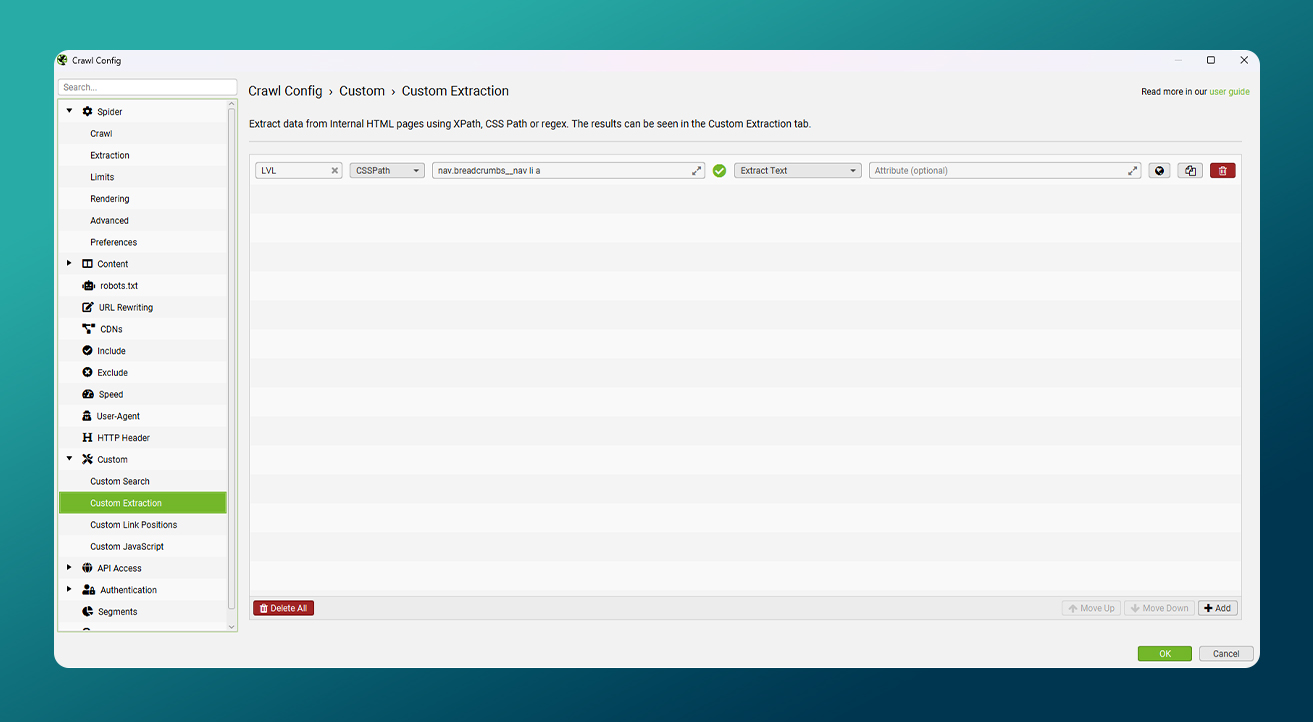
[Image: Screaming Frog Custom Extraction configuration]
Tip: Every website will be different. You can use Visual Custom Extraction to help formulate the syntax.
After applying these settings and before running a full site crawl, it is essential to perform a validation step. While this may appear straightforward, it plays a critical role in ensuring the accuracy of the final output. To validate the extraction, select a small number of URLs representing different page types across the site, run Custom Extraction on these pages only, and manually compare the extracted values against the breadcrumbs displayed on each page.
If the extracted output does not match the visible breadcrumb on even a single page type, the CSS selector or XPath should be adjusted. Only once breadcrumb data is being extracted accurately and consistently across all tested page types should the full site crawl be executed and the data prepared for subsequent analysis.
Step 2: Preparing Breadcrumb Data for Site Architecture Analysis
Once the site crawl has completed, the Screaming Frog SEO Spider provides all extracted breadcrumb data within the Custom Extraction section. However, in its raw form, this data is not yet suitable for analysing or reconstructing site architecture and requires additional preparation.
At this stage, the objective is to transform the raw output into a clean, structured dataset that can be used directly as input for the Python script. This process includes exporting the data in the appropriate format, removing unnecessary columns, and standardising breadcrumb information. These steps ensure the dataset is ready for analysis and visualisation without the need for further manual adjustments.
Exporting Breadcrumb Data from Custom Extraction
After the crawl process has completed, the extracted breadcrumb data becomes available within the Custom Extraction section of Screaming Frog. At this point, the data needs to be exported so it can be processed and analysed in subsequent steps.
For this workflow, the data is exported as an Excel file from the Custom Extraction report. In addition to columns such as Address, Status Code, and Status, the file also includes columns representing breadcrumb paths. These columns typically appear as LVL 1, LVL 2, and subsequent levels, with each column corresponding to a specific level within the breadcrumb hierarchy.
In the next stage of the process, the focus is placed exclusively on these breadcrumb-related columns. All other fields are removed or disregarded to ensure the final dataset is clean, consistent, and properly structured for site architecture analysis.
Cleaning and Standardising Breadcrumb Data in Excel
To reconstruct site architecture effectively, the final Excel file should contain only breadcrumb-related information for all relevant pages. However, the default Screaming Frog SEO Spider export also includes additional columns such as Address, Status Code, and Status, which are not required at this stage.
As a first step, these non-essential columns are removed, leaving only the columns that represent breadcrumb items. This simplifies the dataset and ensures a consistent structure that can be processed cleanly in later stages.
In some websites, the homepage is not included within the breadcrumb trail, or the breadcrumb path does not begin at the site’s root level. In these cases, an additional column is added to the dataset and labelled LVL 0. A fixed value — such as Main Page or the site’s brand name — is then applied to all rows in this column.
This approach ensures that all branches of the site structure are connected to a single root node, allowing the final output to be represented as a cohesive and analysable tree. Once these adjustments are complete, the Excel file contains only breadcrumb data and is ready to be used as input for the Python processing step.
Step 3: Reconstructing Site Architecture Using Python
Once the Excel file exported from the Screaming Frog SEO Spider has been prepared, all prerequisites for reconstructing site architecture are in place. At this stage, breadcrumb data is analysed using a Python script and transformed into a cohesive structural model that reflects the actual relationships between site pages.
The primary objective of this step is to convert the linear data contained in the Excel file into a hierarchical tree structure. This structure makes it possible to accurately identify parent–child relationships between categories and sub-sections, and ultimately to visualise the site’s architecture in a clear and analysable format.
To support this process, the Python script used in this article is provided as a runnable Google Colab notebook. The notebook requires no local installation or setup. It accepts the cleaned breadcrumb Excel file as input and generates a visual representation of the site architecture as a PDF file.
Access the Google Colab notebook here:
https://colab.research.google.com/drive/1Ud_m_yP9Al32ko1Iz6e-6QOIVmnVXTsq
At a high level, the Python workflow consists of the following steps:
- Loading the Excel file containing breadcrumb data
- Processing the data row by row
- Identifying parent–child relationships between structural elements
- Building a tree model from breadcrumb paths
- Visualising the final site structure as a PDF
The final output of this process is a PDF file that displays site architecture as a hierarchical tree. In this visualisation, all breadcrumb paths are clearly represented from the root level through to the deepest pages.
Each node represents a specific level within the site structure, with parent–child relationships visually defined between categories and sub-sections. This makes it easy to distinguish primary and secondary branches and to understand the overall architecture without relying on complex tables or textual reports.
This type of visualisation enables site complexity to be assessed at a glance, highlights the true depth of category structures, and helps identify branches that have become overly deep, unbalanced, or structurally inefficient. For large websites — particularly ecommerce platforms — this output provides a level of architectural insight that is difficult to achieve through URL analysis or standard SEO reporting alone, and can serve as a strong foundation for informed optimisation or structural redesign decisions.
Real-World Example: Reconstructing a Large Ecommerce Site’s Architecture
To evaluate this approach in practice, it was applied to a large ecommerce website with approximately 11,000 indexed pages. The analysis focused exclusively on the site’s ecommerce section, while other areas such as the blog or corporate pages were intentionally excluded. This scope was chosen to concentrate specifically on product-related category structures and navigation paths.
During the initial review, it became clear that the site contained multiple page types, including product pages, category pages, and ecommerce landing pages. A key finding was that the breadcrumb structure was implemented consistently across all ecommerce-related pages. This consistency made it possible to extract breadcrumb data across the entire section using a single, unified configuration.
Step 1: Reviewing the Breadcrumb Structure and Defining the Root Level
The only notable variation identified on this site was the absence of the homepage within the breadcrumb trails on ecommerce pages. To address this and ensure a coherent structural model, a fixed root level labelled LVL 0 was added to the dataset, as described in the data preparation section.
This adjustment ensured that all breadcrumb paths were connected to a single common root, allowing the final site architecture to be represented as a unified and coherent tree structure.

[Image: Breadcrumb structure example on the ecommerce site]
Step 2: Extracting and Validating Breadcrumb Data
In this example, CSS selectors were used to extract breadcrumb elements. The selected CSS path was defined in a way that correctly captured breadcrumb elements across all ecommerce-related page types.
Before running a full site crawl, the extraction process was tested on a sample of different page types. The extracted output was then manually compared against the breadcrumbs displayed on each page to ensure accuracy.
Once the extracted data was confirmed to be correct and consistent, the full website crawl was executed and the breadcrumb data was exported from the Custom Extraction report as an Excel file.
Step 3: Preparing the Data and Reconstructing Site Architecture
In the next stage, the exported Excel file was cleaned and standardised so that it contained only breadcrumb data and was ready for Python processing. The Python script introduced earlier in this article was then executed in the Google Colab environment, with the site’s breadcrumb Excel file uploaded as the script’s input.
Once the analysis process was complete, the site architecture was visualised as a PDF file. This output clearly highlighted the primary structural branches of the ecommerce site, the true depth of category hierarchies, and areas where the structure had become excessively deep or unbalanced.
Download the sample output file:
https://drive.google.com/file/d/1KkRYUr_hLgmvZ7coX2CDahDewFUF99OZ/view?usp=drive_link
Findings from the Real-World Analysis
This output made it possible to analyse site architecture without the need for multiple crawls, manual URL reviews, or interpretation of complex textual reports. Instead, it provided a clear and consolidated view of the ecommerce site’s underlying structure.
At this scale, this type of visualisation can serve as a reliable foundation for more informed decision-making around structural optimisation, navigation simplification, and overall architecture refinement.
Limitations and Out-of-Scope Scenarios
While this approach is effective across many projects, it is important to acknowledge certain limitations and scenarios where relying on breadcrumb data alone is not sufficient for analysing site architecture. Understanding these constraints helps ensure the method is applied appropriately and that the resulting output is interpreted correctly.
Sites Without Visible Breadcrumbs
On websites where breadcrumbs are not visibly displayed on page templates, this approach cannot be applied directly. In these cases, breadcrumb paths are not present within the user interface, making them unavailable for extraction using this method.
This does not mean that reconstructing site architecture is impossible for such websites. Breadcrumb information may still exist within the page source or structured data. However, extracting and interpreting this data introduces additional complexity and requires a different extraction logic. For this reason, these scenarios fall outside the scope of this article.
Breadcrumbs That Include the Current Page Title
In some implementations, the title of the current page is included as the final item in the breadcrumb trail. If this element is incorporated into the analysis without adjustment, it can introduce additional and unnecessary nodes into the resulting tree structure.
To handle this scenario correctly, the breadcrumb item representing the current page should either be excluded from the analysis or the data processing logic should be adapted to account for the site’s specific breadcrumb implementation. Due to the wide variation in how this type of breadcrumb is implemented across different websites, a detailed discussion of this scenario falls outside the scope of this article.
Summary and Key Takeaways
This article introduced a method for reconstructing site architecture based on page-level breadcrumb data. The approach requires only a single site crawl and produces an analysable PDF representation of the site’s actual architecture. Rather than relying on purely technical signals such as URL structures or crawl depth, it focuses on the hierarchical paths the site itself defines to communicate content relationships to users.
This method is particularly well suited for competitor architecture analysis, auditing and refining large ecommerce site structures, and supporting more informed decisions during site architecture redesigns. Visualising site structure as a tree provides a level of clarity that is difficult to achieve through textual reports or manual URL analysis, allowing structural issues to be identified at a glance.
Ultimately, adapting this approach to the specific characteristics of each website can yield valuable insights into page architecture, category depth, and navigation paths. When applied thoughtfully, this methodology can serve as a reliable foundation for improving site structure, user experience, and crawl efficiency.




0 Comments