
User-Agents
Dan Sharp
Posted 7 April, 2016 by Dan Sharp in
User-Agents
You’re able to configure the user-agents you wish to import into a project when creating a new project.
You can choose from the pre-defined list of common search engine and AI bot user-agents, or de-select those that are not relevant. This helps improve performance and reduces disk usage by focusing only on bots of interest.

There are 3 settings that can be configured –
- Filter User Agents (Improves Performance) – This is enabled by default, so only the ‘selected’ user-agents are imported, rather than every user agent. This reduces the size of the import and improves speed of the analysis.
- Include Unknown User-Agents – This option is disabled by default. If enabled, any user agents that are not known (defined by the full ‘Available’ list of user agents) will be included in the analysis. This can be useful for analysing bots that are crawling your website, that are not browsers, or known search or AI bots that you may wish analyse further or block.
- Verify Bots – This will verify that search bots and AI bots that support verification will be verified as genuine, and not spoofed. This will make the initial log file import take longer, or alternatively you can perform this after importing.
The Log File Analyser will by default import data for the following search bot user-agents –
- All Googlebots – This includes Googlebot and Googlebot Smartphone.
- Googlebot
- Googlebot Smartphone
- Bingbot
- Yandex
- Baidu
However, you can choose to unselect or add additional user-agents to these.
The user-agent filter groupings make it easy to filter for the bots you wish to upload and analyse in projects.

For example adding AI bots into the analysis.
Configure Custom User-Agents
You can also add your own custom user-agents, which are then stored and can be selected for projects.
This can be configured via ‘Settings > User-agents’ or in a new project via ‘New > User Agents > Configure User Agents’.

Each new user-agent can be assigned to a category (Bot, Browser, Search Engine Bot, AI Bot, Googlebot) and have verification set up.
When you add a new user agent, you’re able to configure bot verification. You can input IP ranges from a JSON URL, reverse DNS, ASN or static IP ranges to perform verification.
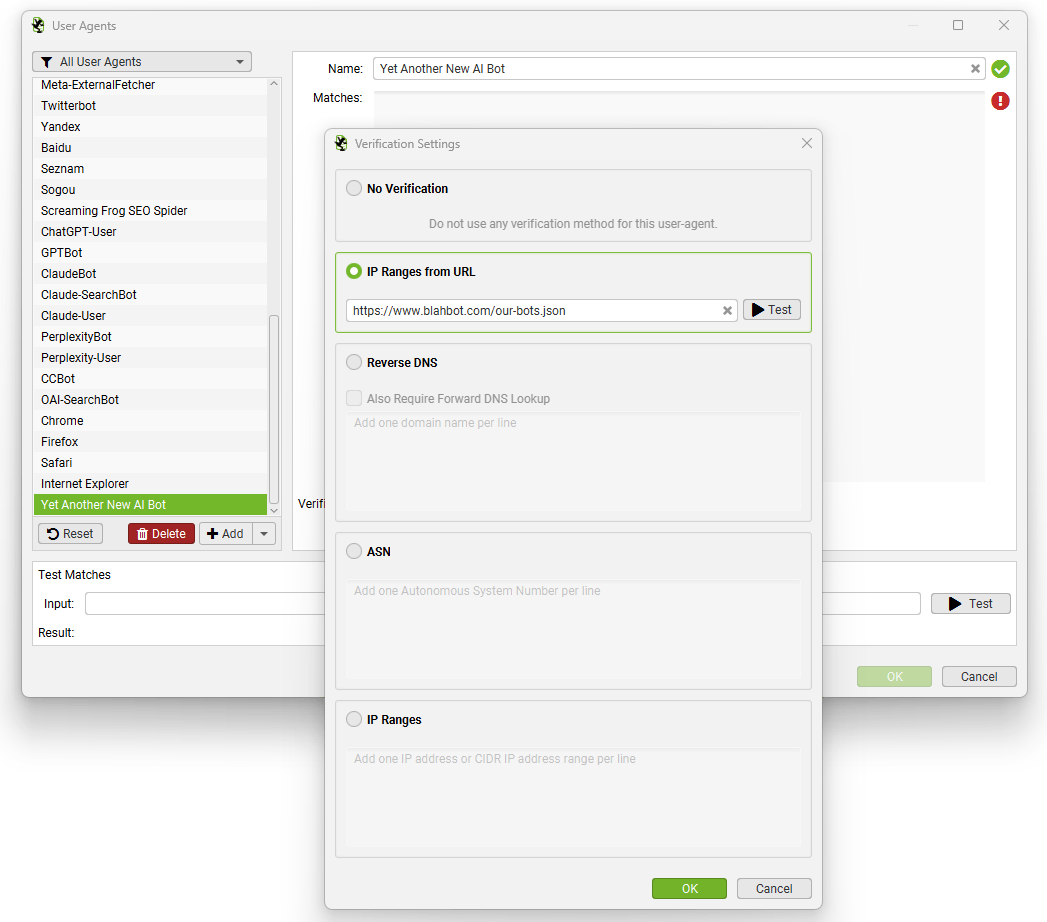
If bot verification changes for any existing user agents, you do not need to wait for our team to push an updated version of the Log File Analyser, you can just update immediately.