
Screaming Frog SEO Spider Update – Version 24.0
Dan Sharp
Posted 19 May, 2026 by Dan Sharp in Screaming Frog SEO Spider
Screaming Frog SEO Spider Update – Version 24.0
We’re delighted to announce Screaming Frog SEO Spider version 24.0, codenamed internally as ‘bolus’.
In this release we have introduced a number of much demanded new features, as well as smaller quality of life improvements and updates.
Let’s take a look at what’s new.
1) Screaming Frog SEO Spider MCP
You can now run crawls, analyse, export and manipulate data using the SEO Spider and node.js within Claude, LM Studio and other AI chat assistants.

The MCP allows you to connect to the SEO Spider and automate countless crawl related activities using natural language. From the basic, such as running and summarising a crawl.

To more fun, and advanced tasks.

Such as manipulating or visualising the data the way you want to view it.
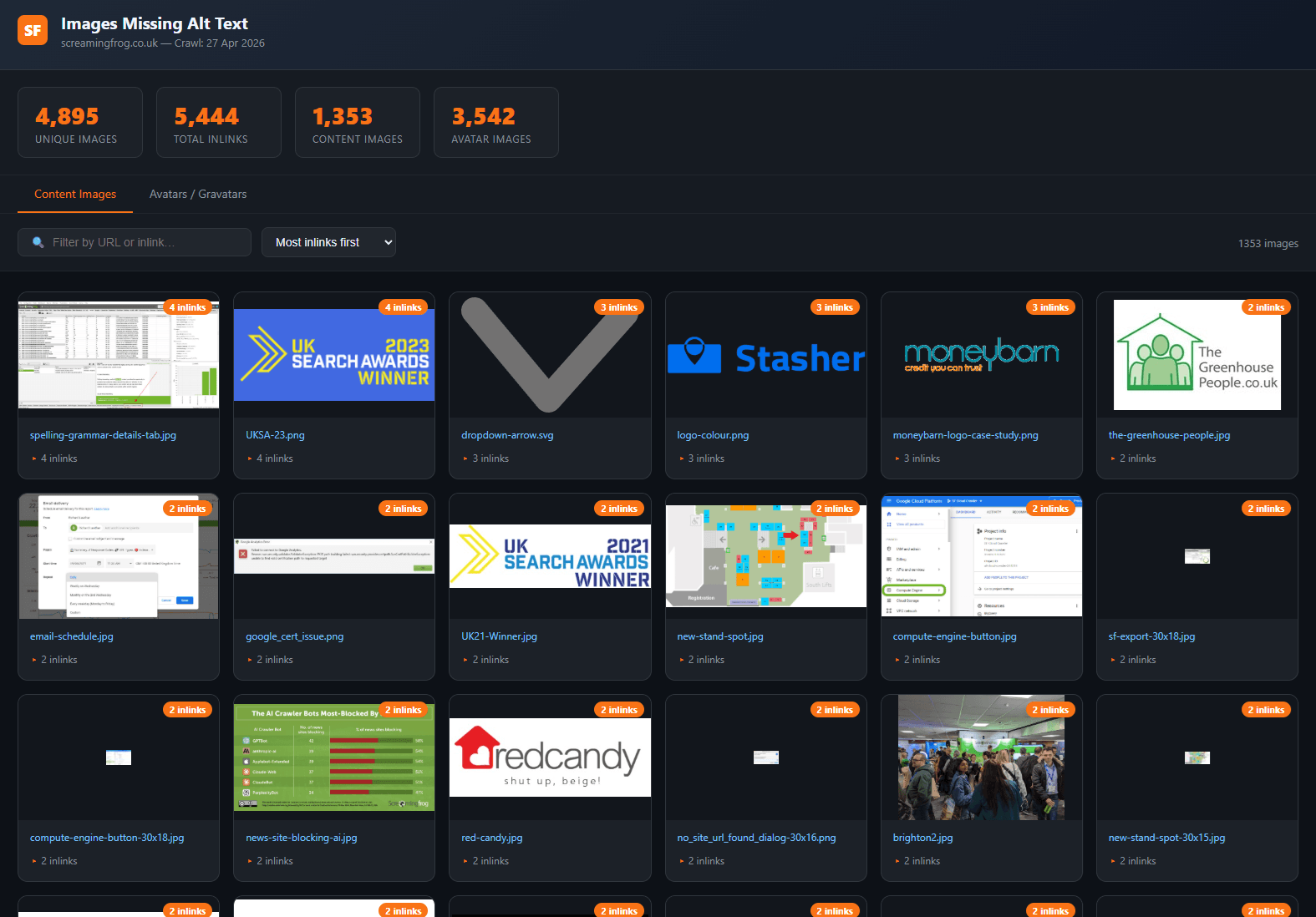
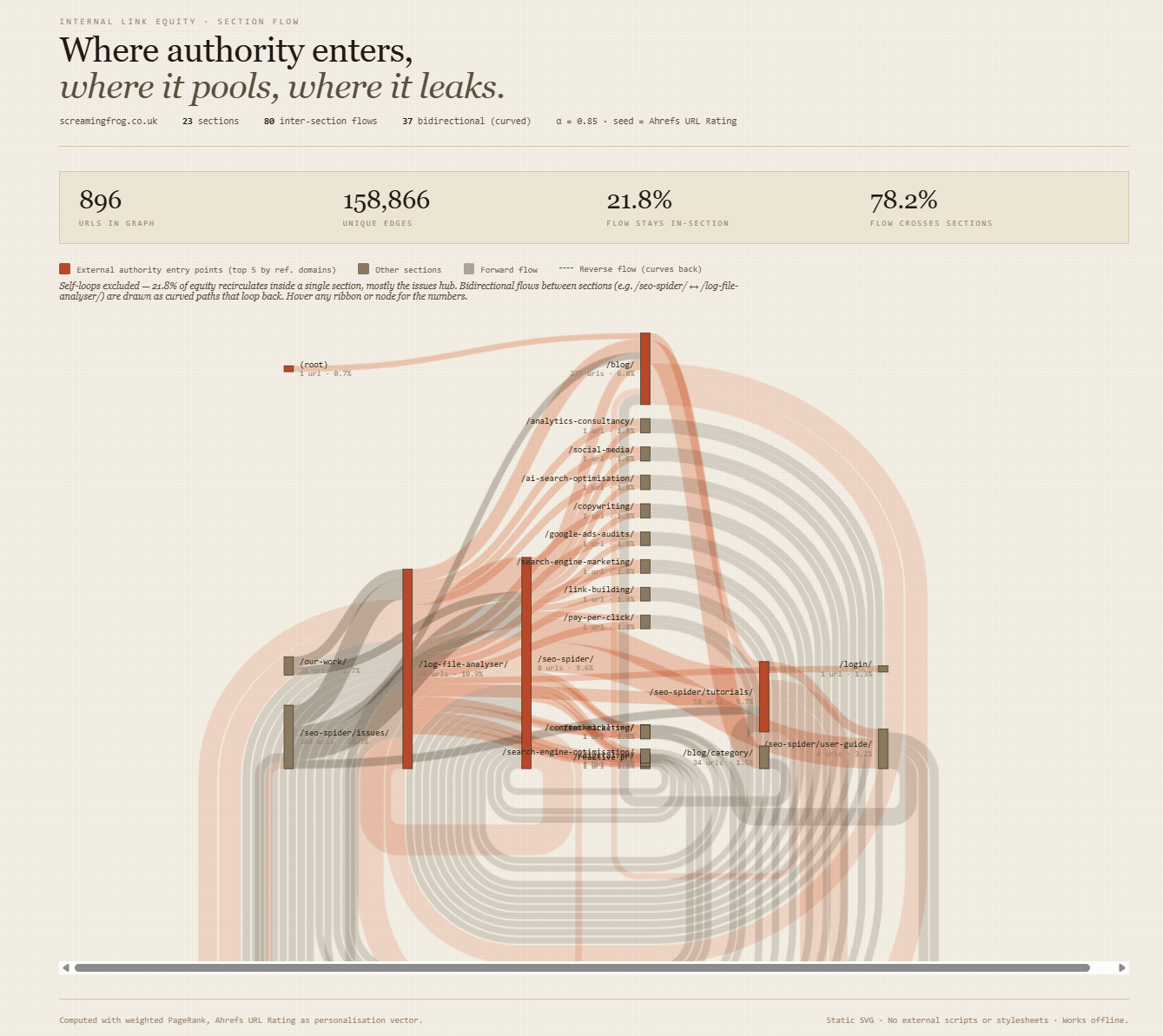
As well as performing the leg work for exporting, combining data, running the analysis pipeline and installing relevant scripts for interactive visuals for greater insight.
Like this pretty link equity analysis we made earlier using the Ahrefs integration in a crawl.
Integrating with Claude Cowork, also opens up lots of possibilities.
There are plenty of use cases, ultimately the idea of the integration is to make daily tasks and workflows that much more efficient. This is not a replacement for an experienced SEO professional, obviously.
To set this up, please refer to our documentation on the MCP Server.
Please note – Not every feature and function is currently supported in the SEO Spider MCP. However, we plan to extend functionality based upon user feedback.
So let us know what else you’d like to see!
2) Auto Compare Crawls
You’re now able to select ‘Auto Compare Crawls’ for scheduled (and CLI) crawls.
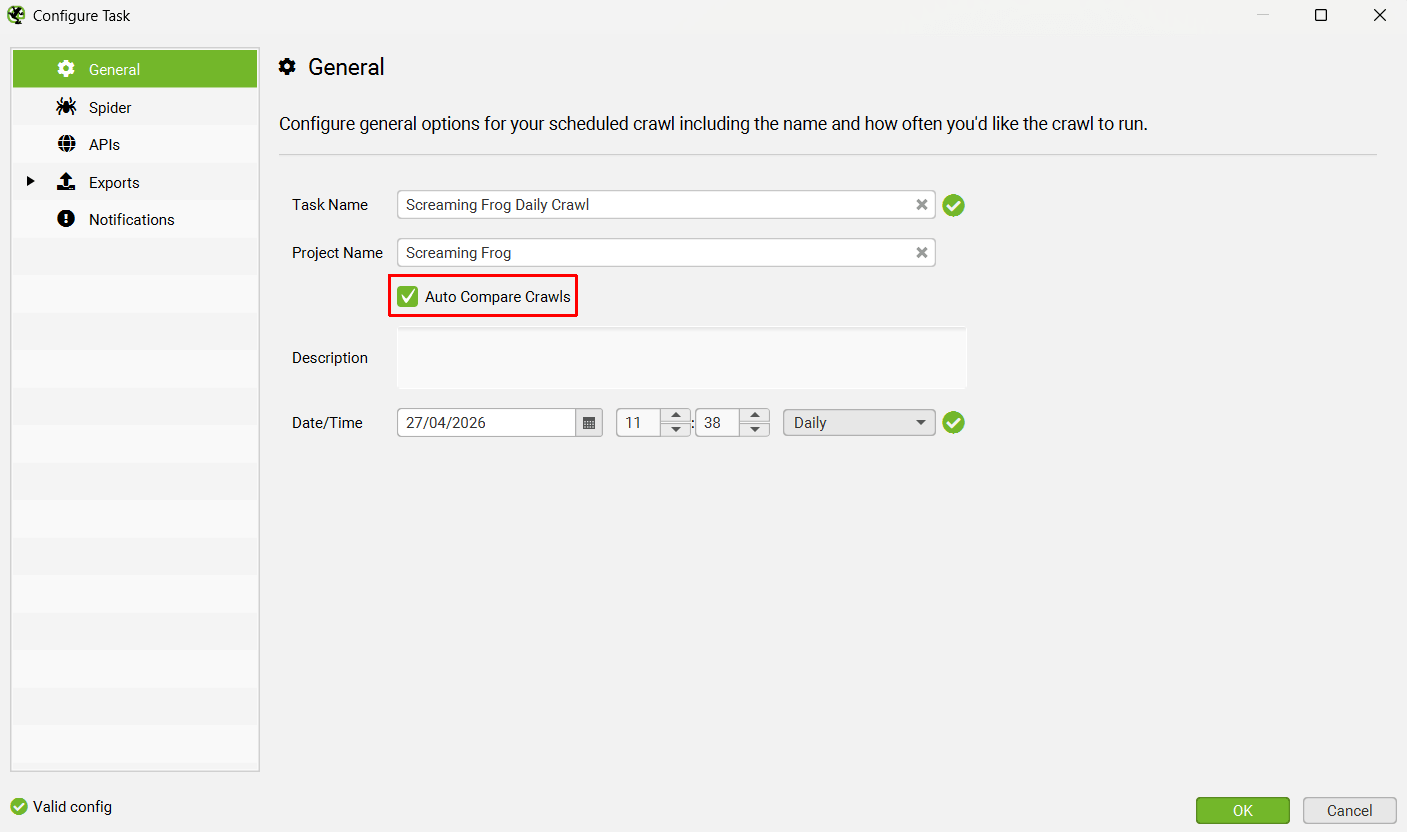
This can be set up in the scheduled crawl task, which will then auto compare the last two crawls performed in a project.
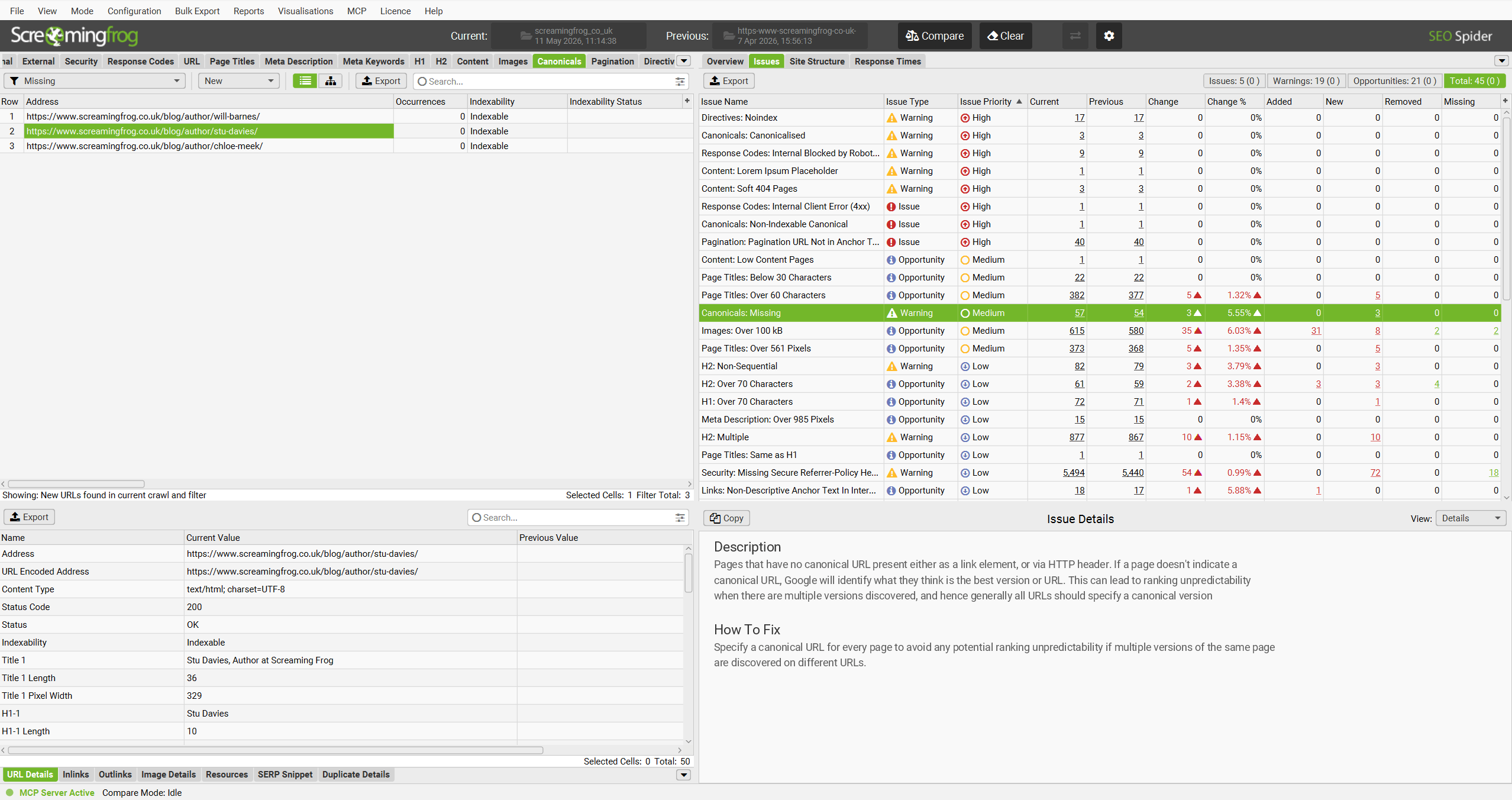
This allows you to quickly view a crawl comparison of the last two crawls, including all changes that have occurred since the last crawl.
Read more in our crawl comparison tutorial.
3) View Crawl Changes in Email Notifications
If you have enabled crawl completion notifications, you will already be familiar with the email summary upon crawl completion.
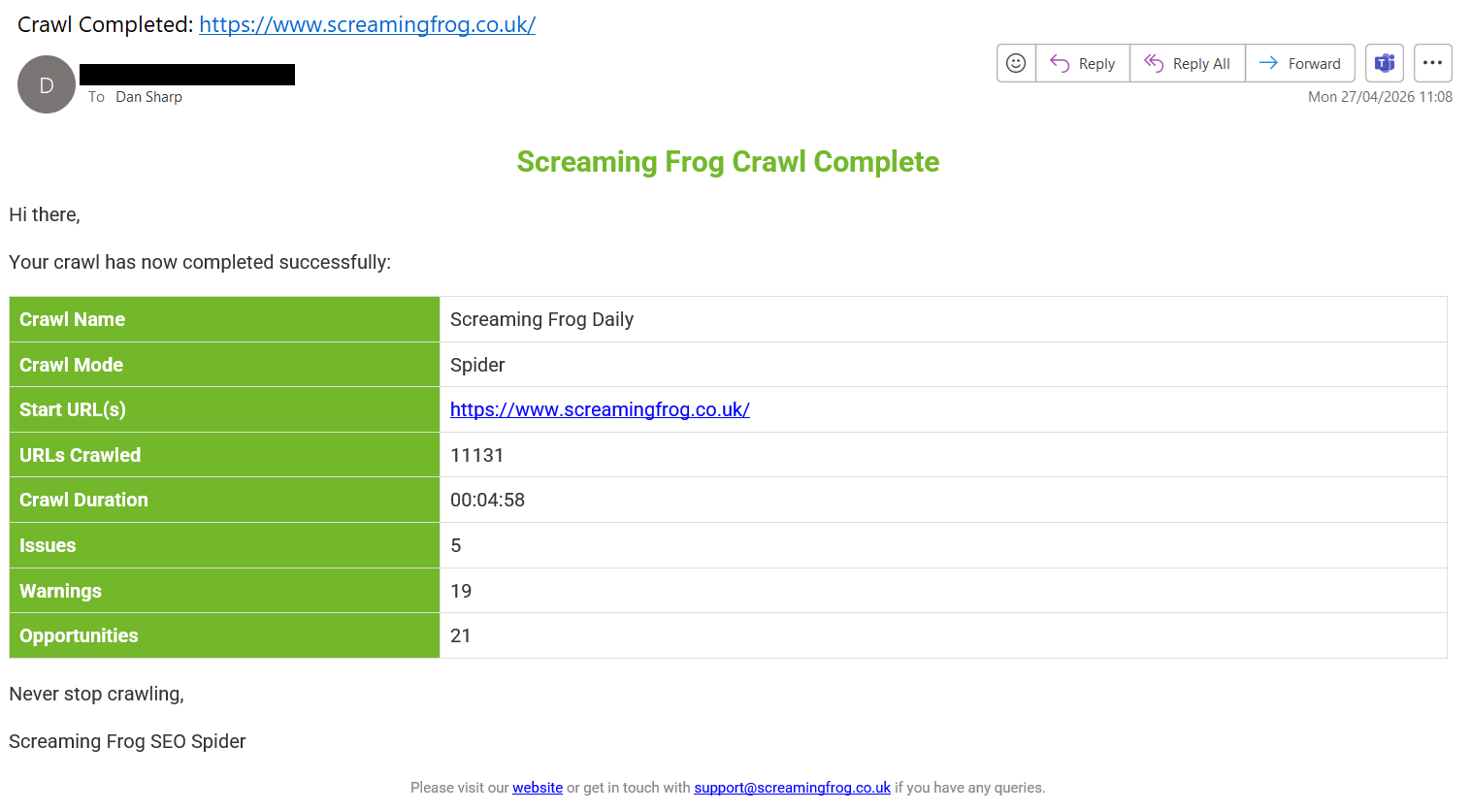
This has been improved to include all issues found within the crawl in a table below the summary.
If you have selected to ‘Auto Compare Crawls’, you will see a crawl comparison of issues in the email – highlighting any changes in issues found between the last two crawls.
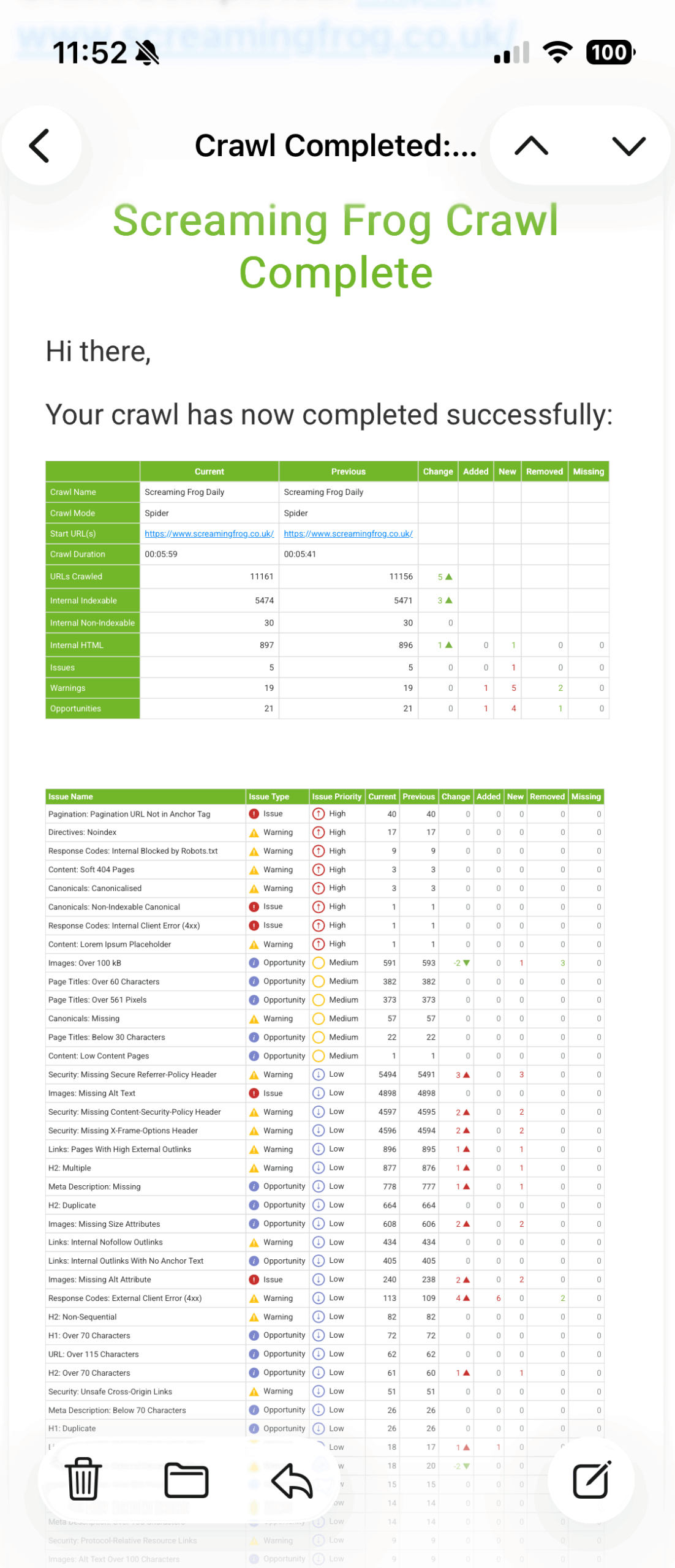
This is a great way to monitor and be alerted to website changes and SEO issues – such as pages being added or removed, a sudden spike in non-indexable pages, or page titles disappearing.
All without having to open up the crawl.
4) Send Crawl Export Attachments by Email
You’re now also able to send emails with export attachments automatically upon crawl completion.
This can be set up in the scheduled crawl task under ‘Notifications‘.
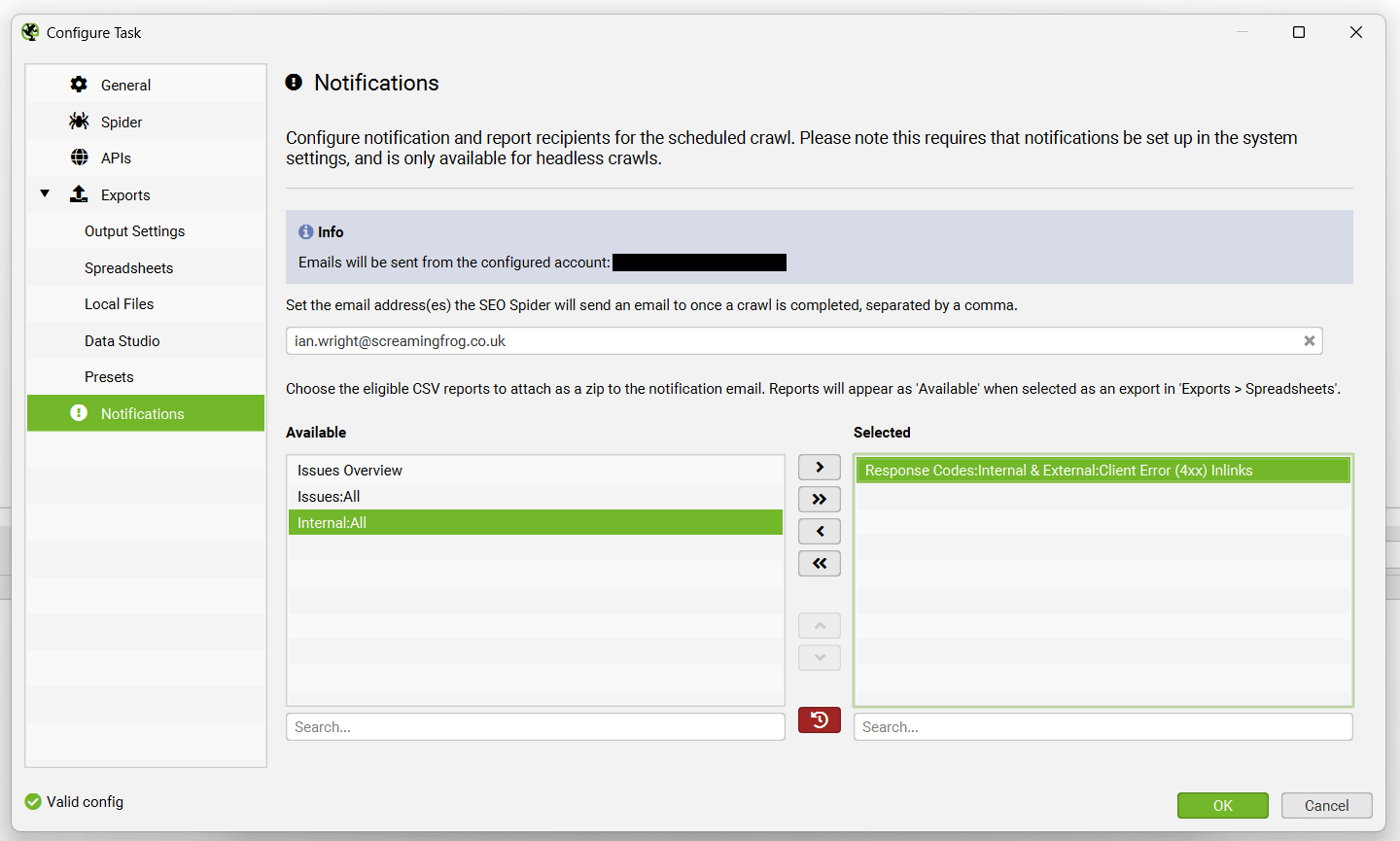
For example, if you need to send a weekly broken links export to a developer, or a crawl issues summary to a stakeholder, you can input their email and the report of choice and it will appear in their inbox.
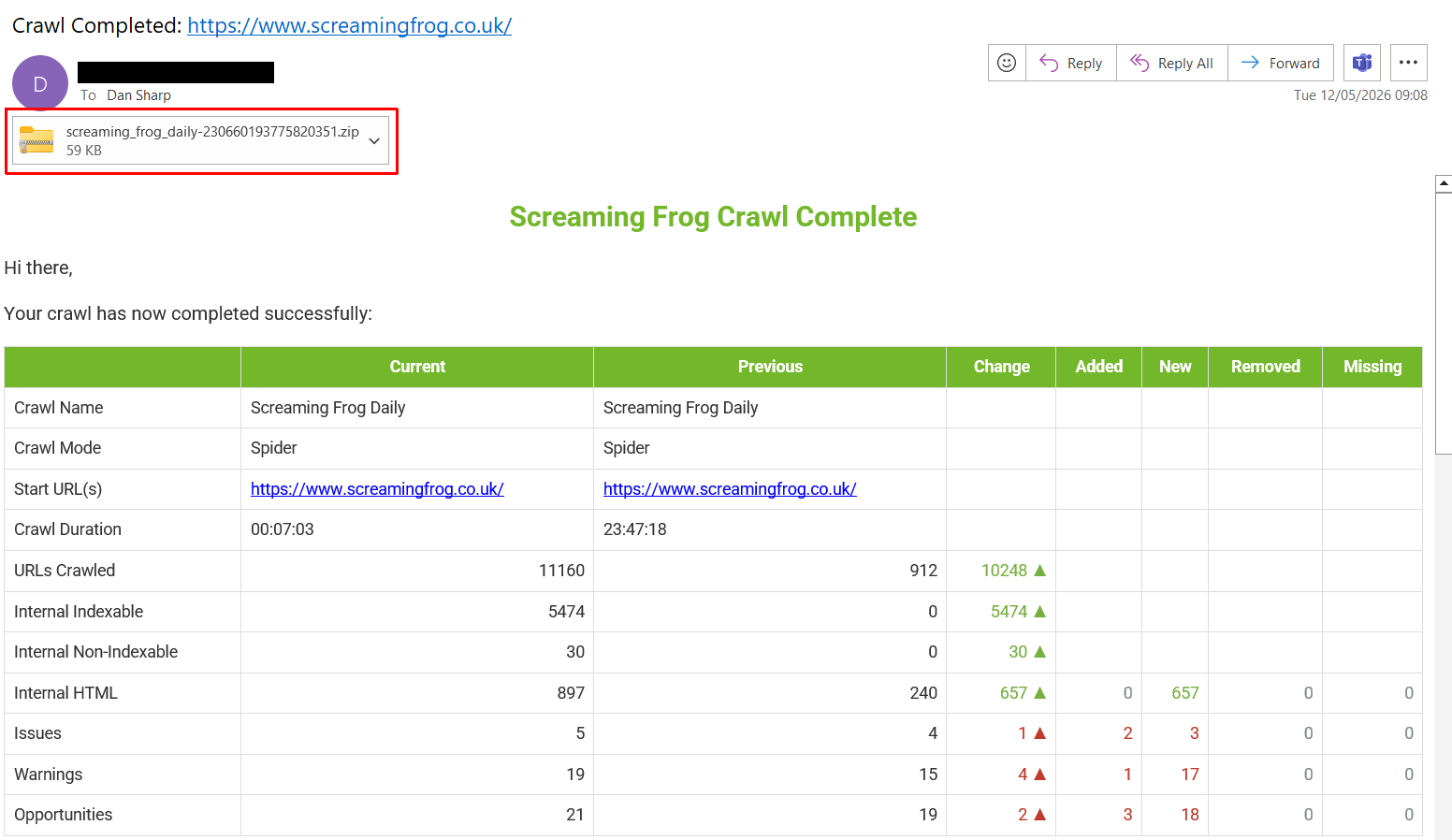
Attachments are zipped and the email will warn the receiver if there is an error, such as attachments being too large in size for the email provider.
Please read our tutorial on ‘How To Set Up Crawl Email Notifications & Export Attachments‘.
5) Find Uncrawlable Links
You can now find common uncrawlable link types in the SEO Spider.
These can be viewed in the Links tab and the new ‘Pages With Uncrawlable Internal Outlinks‘ filter.
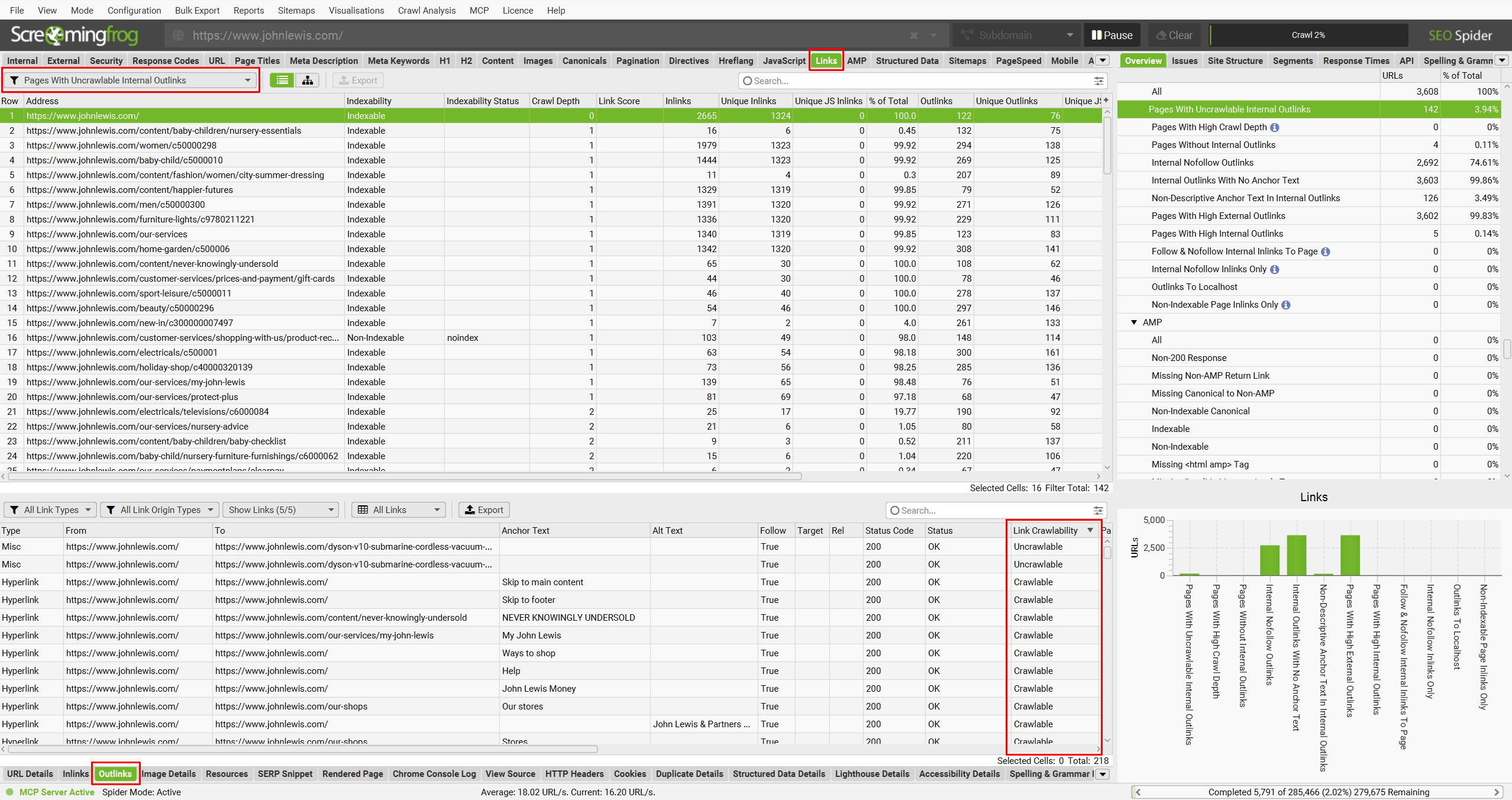
There is a new ‘Link Crawlability’ column in the lower Outlinks tab, which helps to identify any of these link types as ‘Uncrawlable’. They can be exported in bulk via the ‘Bulk Export > Links > Pages With Uncrawlable Internal Outlinks’ export.
Uncrawlable links are links found in the HTML, but do not conform to link best practices outlined by Google. For example:
<span href="https://example.com">

<div href="https://example.com">

<a onclick="goto('https://example.com')">

<a href="javascript:goTo('products')">
To find uncrawlable link types, please ensure ‘Store’ is enabled in the ‘Config > Spider > Crawl’ menu.
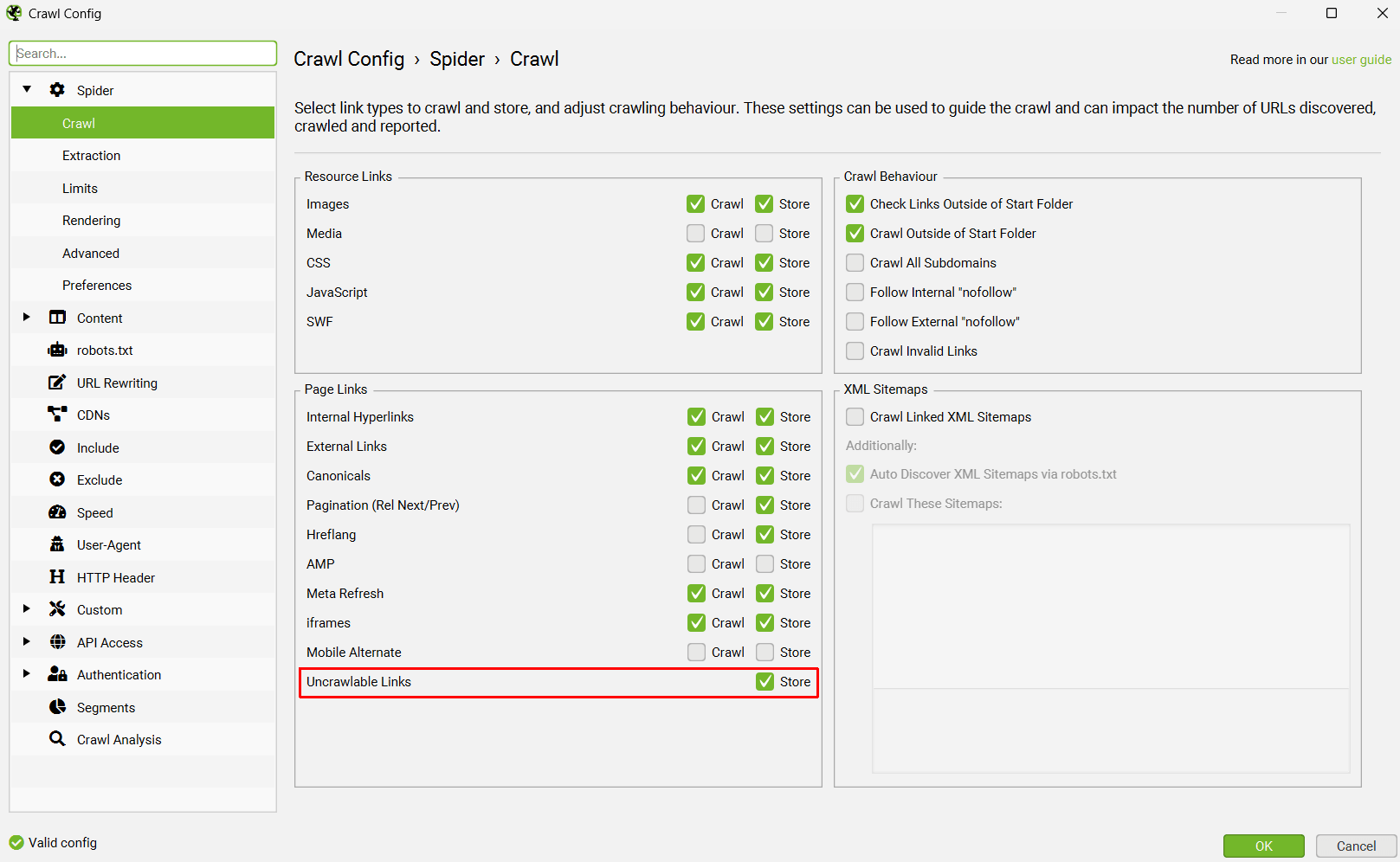
There isn’t an option to crawl these currently, but this might be available in the future as we refine how we parse some of these link types.
Please note – Our research indicates Google will crawl anything in the HTML that looks like a link. They will attempt to parse it and use for discovery. So strictly speaking, many of these link types will likely be ‘crawlable’.
However they are not recommended, and should not be relied upon. They might not be treated in the same way as a recommended hyperlink for passing link signals.
6) Usage Stats
If you’ve ever wondered how much time you spend crawling, then you can now see your own usage data via ‘Help > Usage Stats’.
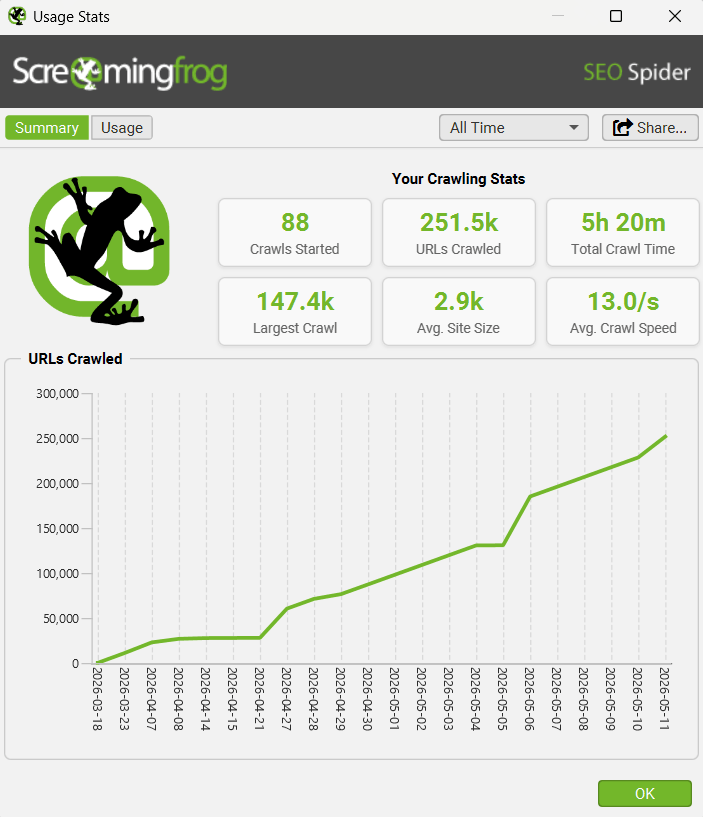
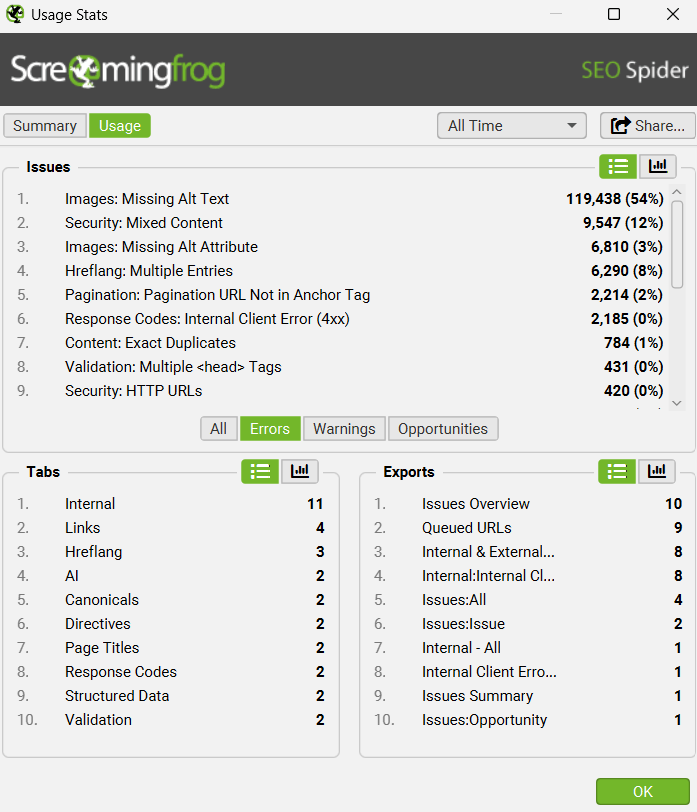
This has limited practical use (!), but is fun and might give you a better idea of how much value you’re getting from the tool each year. This data is stored locally on your machine.
Other Updates
Version 24.0 also includes a number of smaller updates and bug fixes.
- New Arm64 Linux Versions – We now have two more packages available for Arm users for both Ubuntu and Fedora. Our three Linux users will rejoice again!
- Improved Reporting of Syntactically Invalid Links – There’s a new ‘Crawl Invalid Links‘ option under ‘Config > Spider > Crawl’. Enabling this setting means URLs that are syntactically invalid such as hppts://example.com will be parsed, crawled and reported upon. These will typically appear under ‘Response Codes > No Response’ as malformed links.
- Skip Empty Reports – You can now skip exporting empty reports in ‘Output Settings’ of scheduled crawl tasks, and ‘Bulk Export > Multi Export’. This means any exports that have been selected that do not contain any data, will not be exported. They will also not be attached in email notifications exports.
- Ahrefs Country Level Metrics – There’s a new ‘Options’ tab in the Ahrefs integration with filters to adjust data for countries and volume (monthly or average).
- Filterable Content Clusters – You’re now able to click on the content cluster legends in the graph to enable and disable their appearance in the diagram.
- Live Model Validation & List In AI Integrations – When you connect to an AI provider, the model selected in the prompt will be checked against the live model list endpoint and alert you if they don’t exist – and allow you to select a live model. With models changing so frequently, both system and user prompts can quickly become deprecated.
- System Wide Prompt for AI Integrations – In the ‘Advanced’ tab of each AI provider integration, you’re able to include a chat system prompt to establish the role, personality, constraints, and overall behaviour, providing foundational instructions that guide all its responses for consistency and relevance.
- AI Provider Token Usage – Token usage is now displayed on the ‘Account Information’ dialog for each AI provider when connected.
- Ollama Image Generation & Request Timeout – The Ollama integration now supports their image generation and has an adjustable ‘Request Timeout’ in the advanced tab.
- Renamed Looker Studio Back to Data Studio Again – For our automated crawl reports in
LookerData Studio. Google is definitely messing with us all at this point. - Java 25 – One for the purists. Version 24 has been updated to Java 25.
That’s everything for version 24.0!
Thanks to everyone for their continued support, feature requests and feedback. Please let us know if you experience any issues with this latest update via our support.
Small Update – Version 24.1 Released 8th June 2026
We have just released a small update to version 24.1 of the SEO Spider. This release is mainly bug fixes and small improvements –
- Added recently crawled URLs to scheduled crawl seed textbox.
- Added a view to ‘Usage Stats’ graph to switch away from cumulative (a running total), to standard non-cumulative data points.
- Added ‘Auto-start MCP Server on application launch’ setting for cloud.
- Added ability to Bulk Export all multi file exports in MCP Server.
- Included an option to download MCP API as markdown via ‘MCP > Configure > View Tools’ and the button at the top.
- Increased GSC read time out to 2 minutes from 20 seconds.
- Updated MCP Server progress to include APIs and Crawl Analysis.
- Fixed issue with URL Inspection not working in API mode with ‘Ignore Non-Indexable URLs For URL Inspection’ enabled.
- Fixed issue with MCP server returning “Tool error: Page content size too large” using sf_url_content tool.
- Fixed issue with MCP Server logging to stdout in CLI Mode.
- Fixed issue with some MCP server tools not working in non-English languages.
- Fixed various unique crashes.
Small Update – Version 24.2 Released 22nd June 2026
We have just released a small update to version 24.2 of the SEO Spider. This release is mainly bug fixes and small improvements –
- List available reports when a CLI crawl fails to start due to an invalid report name.
- Add database id to sf_crawl_progress when using the SEO Spider MCP.
- Remove the retired Google FAQ rich result feature.
- Updated to new AXE version 4.11.4 for accessibility audits.
- Fixed JVM Crash for windows users when using via RDP.
- Fixed isssue with Custom JavaScript browser preview window not loading.
- Fixed Chromium Rendering Error with Archive of Website.
- Fixed various unique crashes.
Small Update – Version 24.3 Released 29th June 2026
We have just released a small update to version 24.3 of the SEO Spider. This release is mainly bug fixes and small improvements –
- Updated our version of jackson-databind from 2.21.2 to 2.22.0 to fix several CVEs.
- Fixed various unique Java crashes on Windows, unfortunately this means reintroducing a crash when using RDP. Please see see our FAQ on using RDP/VNC on Windows.




Cool, I was thinking about how to use headless mode with AI. Finally, the Screaming Frog team did it!!! I’m so excited about the new update.
by the way hou do you connect MCP with claude?
Hi Roy,
Check out our user guide here – https://www.screamingfrog.co.uk/seo-spider/user-guide/configuration/#mcp-server
We have an MCP extension you can use essentially!
Cheers
Dan
Hello Dan,
Thanks for quick reply. This is extreme helpful, I was wondering how could you use chat mode to run screaming frog hahaha
Thanks,
Roy
When/where is the 24.0 update link at? keen to give it a go
Hi Dan,
You can download from the SEO Spider page – https://www.screamingfrog.co.uk/seo-spider/
There’s a download button.
Cheers.
Dan
Hi Dan, still says 23.3 for me on that page. Can you provide a direct download button for v 24? Thanks!
Hi Patrick,
I think the text is just cached, it will still be v.24 you download!
I’ll purge!
Cheers.
Dan
Heads up it still says “SEO Spider v.23.3” after you click the “download” button. The actual download is v24.0 though.
Cheers, Lee!
Hi Dan,
very nice new features.
Is it still not possible to pause or cancel an ongoing scheduled crawl though or has that been updated?
Thanks, Emmanuel.
Not yet, but this is on the ‘todo’ list. Happy to add a vote in for you for it.
Cheers.
Dan
Wow! This is some serious update! Claude + SF MCP would be crazy good!
This is truly amazing, thanks for all of us !
Finally, the MCP integration is here. Running crawls and pulling data straight into Claude using natural language is going to save a serious amount of time on technical audits.
Buen día!
Excelente actualización, seguramente nos será de gran ayuda. Sin embargo, no logro verla; únicamente me aparece la versión 23.3 y no la 24.
Does it work with other llms as well? /co-pilot chatgpt?
Great update! I just installed it and am now going to connect it with Claude for automatic audit interpretation and reporting.
Let’s see how it goes
MCP Server excites me the most. Just updated to the latest version! Thanks for this amazing update and please keep up the good work :)
Just updated and the MCP server is incredible. Letting Claude handle the export and visualisation step while I focus on the actual analysis is going to change my whole audit workflow.
Oh come on, we’re more than 3! =D
Hi, when Claude.app starts and connects to the Screaming Frog MCP Extension, it consistently throws a JSON parse error: “Unexpected non-whitespace character after JSON at position 4 (line 1 column 5)”. This appears at every startup and shows as a “failed” status in Claude’s MCP settings.
After the initial error the connection recovers and all tools work correctly, so it’s not breaking anything — but the persistent error notification is annoying.
Looking at the logs, it seems Screaming Frog is outputting non-JSON content to stdout during startup, before the MCP handshake completes. Claude.app tries to parse everything on stdout as JSON and throws on the unexpected characters.
Using Screaming Frog SEO Spider v1.0.0 on macOS with Claude desktop app.
Hi Tim,
To resolve the above, please –
1) Set the language to any supported language other than ‘System’ . If you open the UI and go to ‘File-> Settings-> Language’ you can adjust it. This will be fixed in our next update, as it is a bug.
2) Ensure you have version 24 installed before the MCP extension (https://www.screamingfrog.co.uk/seo-spider/faq/#why-do-i-get-a-unexpected-non-whitespace-character-error-after-installing-the-claude-mcp-extension). You may need to uninstall the extension and reinstall.
Cheers
Dan
wow let me update. i was waiting for this MCP server freature! thank you SF team!
Hello everyone,
in my company everyone is excited about starting crawls via Claude or other LLMs, but I was wondering if there was also a way to programmatically do it? Maybe I missed something, but I havent found an API that lets me automate this myself.
Is this only possible via an LLM? And if so, why not provide an API as well?
Thanks in advance and kind regards
Marlene Knapp
Hi Marlene,
We don’t have an API, but as a desktop app we do have a CLI – https://www.screamingfrog.co.uk/seo-spider/user-guide/general/#command-line
Cheers.
Dan
The new MCP integration for AI assistants sounds incredibly useful for automating repetitive crawl tasks. Looking forward to trying it out with Claude.
Great feature. But I am waiting to have a possibility to configure SF as a headless installation on any linux. I know some files are binary but … Have my own SF as MCP on my own headless linux with plenty different configs :)
Pawel / Semgence
Please have consideration for those who cant use the C drive (my laptop has 1gb on C and 1tb on D) but everything points to C,, i’ll install on D but everything still wants to go to D. ive set the laptop to install on D by default but SF wants everything on C regardless of my instructions.
Hi Wayne,
Please can you drop us an email via [email protected]?
We can then look into this for you!
Cheers
Dan
Fantastic job – as always.
Fantastic update! Is the list mode enabled for MCP crawls? I’m running into an error. Claude is able to crawl only 1 URL. The CSV I’m using have URLs in the right format (GSC export). If I upload it into Screaming Frog manually, it crawls well. When it goes through MCP it fails every time. Spider mode works normally. Any idea what can go wrong? Or is list mode not supported yet? Thanks!
Hi Adam,
List mode is not yet supported via the MCP.
However, I have just seen a GH enhancement closed with it added. So won’t be long until we release with full support.
Cheers
Dan
Hi,
What you have done is really unacceptable. I cannot import the scheduling backup I created in version 24.1 into version 24.3, and version 24.1 is no longer available anywhere.
How are you going to resolve this issue and compensate for the inconvenience I am experiencing? This is not a major upgrade from version 24 to 25; it is only a minor update with small changes. Creating this kind of incompatibility and leaving users in this situation is completely unreasonable.
Hi Orkun,
Scheduling import/exports need to be in the same version.
If you email [email protected] we can provide older versions, so you can easily export and import, then upgrade to the latest version.
Simple!
Dan
Thanks for the update!
This is a really strong update, especially for teams that already use Screaming Frog as part of a regular SEO workflow. I like that you clearly say AI is not a replacement for an experienced SEO professional. Used properly, this looks less like “AI doing SEO” and more like removing repetitive work so SEOs can spend more time interpreting what actually matters.
I’d been really looking forward to the MCP update. I’m glad to see this tool being developed so actively.
Hello, it looks like the Screaming Frog Streamable HTTP MCP extension’s name being too long for Claude API: The API caps tool names at 128 characters.
Here is the detail:
mcp__remote-devices__Screaming_Frog_SEO_Spider_Streamable_HTTP_MCP_Extension__sf_list_available_data_fields_for_seo_element_and_filter
which is 134 characters and claude error is:
API Error: 400 tools.43.custom.name: String should have at most 128 characters Something went wrong Try sending your message again. If it keeps happening, share feedback so we can investigate. API Error: 400 tools.43.custom.name: String should have at most 128 characters
Could you look into it ?
Thanks
Hi Yannick,
Please can you pop us an email ([email protected]) about this issue?
Thanks,
Dan
Hi SF team, I’ve a quick question!
How can we check if you release an updated MCP connector? Or you don’t plan to do so if not (eventually) just when you publish a major SF release?
Thanks!
I updated Screaming Frog today and this post was really helpful to understand what has changed in the new version. The MCP integration looks quite useful, especially for making SEO work faster with AI tools. The crawl comparison and improved notifications are also good additions. Overall, an excellent update for regular Screaming Frog users.